Hello everyone,
In this article, I would like to share my understanding of IP and MAC addresses using simple explanations and an analogy based on my university register number. I hope this article helps you build an intuitive understanding of how these two addresses work together to enable communication between devices. Let's start.
What is MAC address?
MAC address - stands for Media Access Control address
In networking, Media refers to physical medium in which digital signals can travel. It includes, for example
Ethernet cable
Optical/Fiber cable
Radio waves
In a local network, multiple devices such as PCs are interconnected. To Access and Control a particular device, we need MAC address.
Definition : MAC address is a unique, 48-bit (6 byte) hexadecimal identifier (e.g. - AA : BB : CC : DD : EE : FF) assigned permanently to a Network Interface by the manufacturer used to uniquely identify a device in a local network.
Simple Definition : MAC address is a unique number used to identify a device in a network.
Note : Although it is intended to be permanent, modern operating systems can temporarily use randomized MAC addresses for privacy.
Overview :
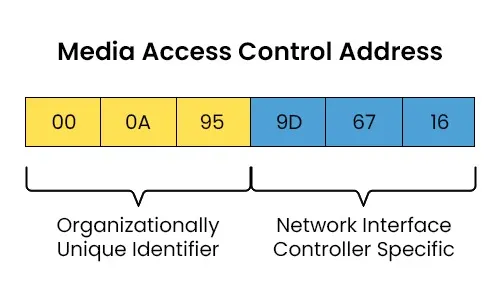
MAC address is composed of two parts :
OUI number (first 3 bytes) - Identifies the manufacturer or vendor of the network interface card (e.g., Apple, Intel, Dell).
Device Identifier (last 3 bytes) - uniquely identifies the specific device within the manufacturer's production line.
What is IP address?
IP address - stands for Internet Protocol address
In networking, the term Internet is the expansion of Interconnected networks meaning connecting different networks to share data.
In diplomacy, protocol refers to the set of rules and etiquettes strictly followed by the officials of different countries to communicate with each other smoothly and respectfully without misunderstandings.
Similarly, to communicate (i.e to share data) with different networks, we need IP address.
Definition : IP address is a unique, logical 32-bit (for IPv4) or 128-bit (for IPv6) identifier assigned to a Network Interface used to locate devices and route data across the internet.
( The word logical I used, plays a vital role signifying it is not permanent and answering who assigns an IP address for a device especially network interface. I have explained later in this article.)
Simple Definition : IP address is a logical unique number used to locate a device and route data across the internet.
Overview :
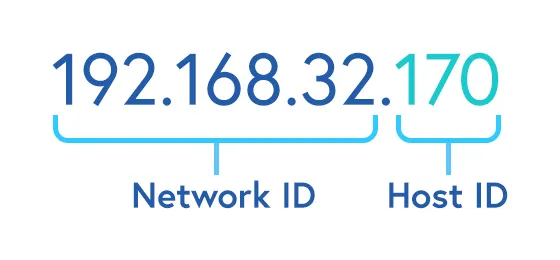
IP address is composed of two parts :
Network ID - defines a network and is used to locate the network.
Host ID - defines a unique device within that network.
This breakdown of IP address is defined by a 32-bit number (for IPv4) called subnet mask.
Example : Consider the IP address is 192.168.32.170 and the subnet mask is 255.255.255.0. Then 255 represents it belongs to network id and 0 represents it belongs to host id. Therefore the first 24 bits (3 bytes) is network id and the last 8 bit (1 byte) is host id.
(Note : subnet means sub-network, mask means hiding.)
IP vs MAC Address
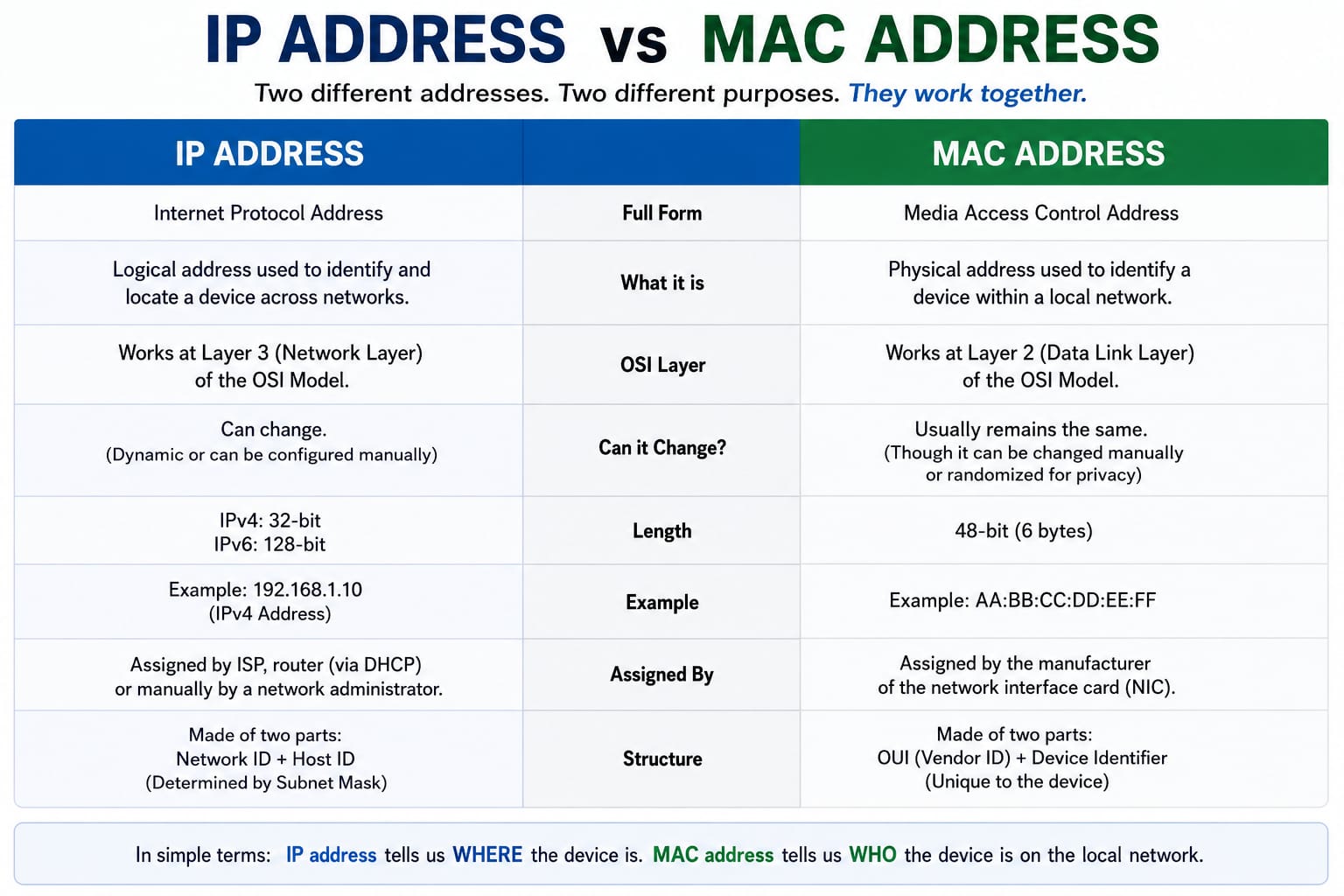
Here we come to the core part of this article. Many of those even me initially confused between IP and MAC addresses since they seems both are used to uniquely identify a device. Although both uniquely identify devices, they serve different purposes.
To explain this from what I have understand with an example, I want the readers to go through my University Register number : 2024503542
2024 defines my academic year
50 defines my campus
35 defines CSE department
42 defines my roll number
Example :
Analogy :
MAC address - my name (Arumparithi)
IP address - my register number (2024503542)
Scenario :
A message to be sent from dean office to me assuming they only know my register number.
Assume the official in dean office (source device) wants to send the message to me (destination device) through a nearby student (router) with my register number(IP address). The student(router) can see my first 8 digit register number (network id) and identifies I am belongs to CSE department (network), therefore he can able to come to my department class. Note that he can also send this message to his friend(another router that routes to the destination network) who knows me. When he comes to my class(network), he will ask who has roll number 2024503542 (IP address). I (destination device) will respond to him by saying my name as Arumparithi (MAC address). He replies back "Hey Arumparithi, You got a message from dean office(source device)" and I will receive the message successfully.
Note here that if I changes my department (network), the register number (IP address) will change but my name (MAC address) is same.
Drawback : In this example, I have compared the MAC address to my name. But there can be multiple students with the same name in a class. Hence, for the sake of simplicity, let us assume that every student in the class has a unique name.
To see your MAC address and IP address, open CMD and enter this command :
For Windows :
ipconfig /allFor Linux :
ip a
Note : When you use these commands to see them, you can see for each interface has separate unique MAC address. For example , if your device has WiFi adapter, Bluetooth connection and Ethernet port, all three have their own unique MAC address.
Who assigns IP address?
Public IP addresses are managed through a hierarchical system to ensure uniqueness worldwide :
IANA (Internet Assigned Numbers Authority): The top-level organization that manages the global pool of IP addresses.
RIRs (Regional Internet Registries): IANA allocates large blocks to five RIRs based on geography (e.g. : APNIC for India).
ISPs (Internet Service Providers) & LIRs: RIRs assign blocks to Local Internet Registries (mostly ISPs such as Airtel, Jio, Vodafone, BSNL etc.). The ISP then assigns individual public IP addresses to our router or device.
DHCP Server : Most commonly, our router acts as a DHCP server. It automatically leases a temporary local IP address to our device when it connects. This is the standard for smartphones, laptops, and most consumer devices.
Manual Configuration : A network administrator (or you) manually types a specific, permanent IP address into the device's network settings. This is often used for servers, printers, or network equipment that need a fixed address.
Glossary
Network - A set of computers and other devices (such as printers, smartphones, servers) connected together.
Router - A networking device used to route data from one network to another network.
Network Interface - a point of connection between a network device (such as computers) and the network. Network Interface Card (NIC) is the hardware component that contains ethernet ports, WiFi - adapters to connect with network to share data.
About the author
- Pre-final CSE student at Anna University, MIT Campus. Passionate about problem solving and learning new concepts. Aspiring Cybersecurity Professional.
Comments
Join the discussionNo comments yet. Be the first to comment.